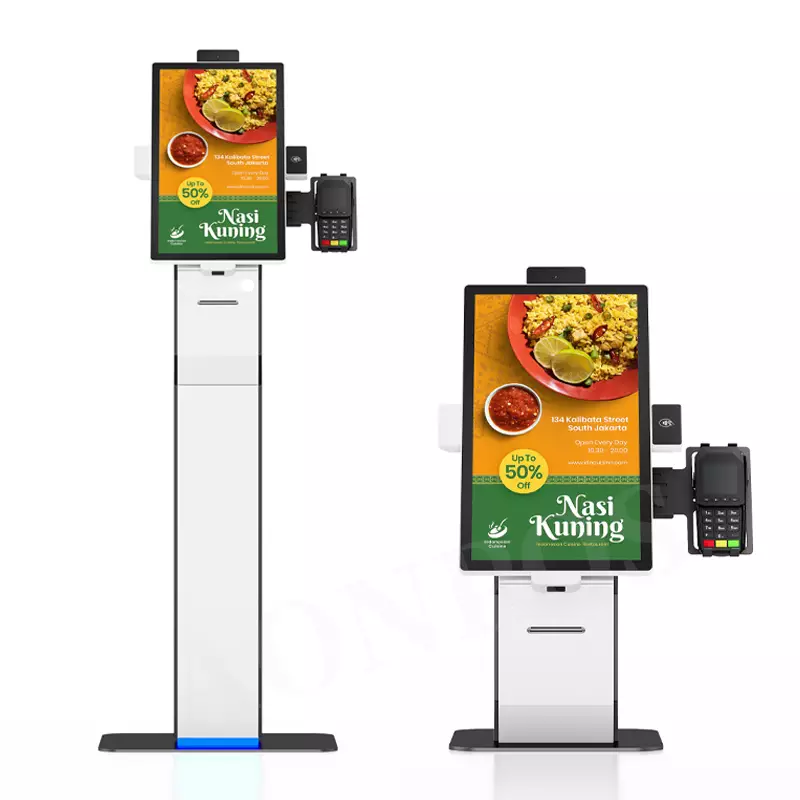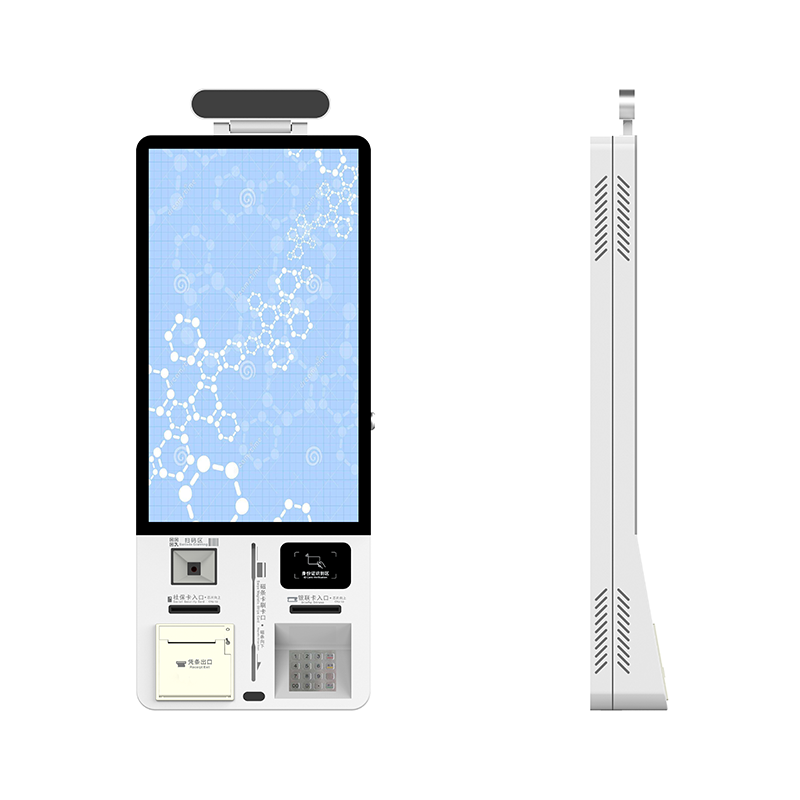
A slow checkout process can frustrate customers, increase queues, and put pressure on your staff during busy periods. UN borne de paiement sans contact helps you combine self-service ordering, digital payment, and receipt printing in one terminal, allowing customers to complete more steps independently. For restaurants, cafés, points de restauration rapide, et magasins de détail, the right kiosk can make ordering more convenient while supporting different payment preferences.
Shenzhen Xingtongda Information Technology Co., Ltée. (XTD) manufactures intelligent self-service equipment and provides OEM/ODM services. Its 21.5-inch multi-payment self-ordering kiosk integrates a Full HD touchscreen, Lecteur NFC, bankcard reader, Lecteur de carte à puce, Scanner de codes QR, PIN pad, et imprimante de reçus thermique. This configuration gives you a practical starting point for evaluating a self-service solution based on your location, payment requirements, and software environment.
What Is a Contactless Payment Kiosk?
A contactless payment kiosk is a self-service terminal that allows customers to interact with a digital interface and complete supported transactions without relying entirely on a cashier. Depending on its configuration, the kiosk can accept contactless card or mobile wallet payments, scanner les codes QR, and print receipts.
XTD’s 21.5-inch model combines ordering and payment functions in a single unit. You can use it to support self-ordering workflows in restaurants and selected retail environments, subject to compatible payment services and application software.
Les fonctions clés incluent:
- Touchscreen ordering: A 21.5-inch LCD with 1920 × 1080 resolution and 10-point capacitive touch.
- Multiple payment options: NFC, bankcard, magnetic stripe, carte à puce, and QR code reading.
- Impression de reçus: Un 80 mm thermal printer with automatic cutting.
- System integration: Wi-Fi, Ethernet, 4G en option, and POS or restaurant management system compatibility.
- Flexible installation: Wall-mounted or floor-standing configurations.
Key Specifications of XTD’s 21.5-Inch Payment Kiosk
When choosing a self-service terminal, check the hardware against your ordering process, available space, et exigences logicielles. The following specifications describe the advertised configuration of XTD’s multi-payment self-ordering kiosk.
| Composant | Spécification |
|---|---|
| Afficher | 21.5-pouces LCD, 1920 × 1080 |
| Écran tactile | 10-ponctuel capacitif, transmittance above 85% |
| Système opérateur | Androïde 11; Fenêtres 10 facultatif |
| Modules de paiement | NFC, bankcard, magnetic stripe, carte à puce, Scanner QR, PIN pad |
| Imprimante de reçus | 80 imprimante thermique mm avec découpe automatique |
| Connectivité | Wi-Fi, Ethernet, 4G en option |
| Logement | Cold-rolled steel with powder coating and tempered glass |
| Presence detection | Infrared human body sensor |
| Installation | Wall-mounted or floor-standing |
| Alimentation | 100 à 240 V CA, 50/60 Hz |
Avant de passer une commande, confirm the supported payment protocols, acquiring service, printer specifications, système opérateur, and integration requirements with XTD. Hardware compatibility alone does not guarantee that a particular mobile wallet or bankcard payment service will work in your market.
How Multi-Payment Kiosks Improve Ordering Workflows
1. Give customers more payment choices
Different customers prefer different ways to pay. NFC supports compatible contactless payment methods, while the bankcard reader, Lecteur de carte à puce, and QR scanner accommodate other supported transaction types.
Par exemple, a coffee shop may configure its ordering interface to let customers select drinks, review their orders, and proceed to a compatible payment method. Actual payment availability depends on the installed modules, payment software, and local service providers.
2. Reduce manual steps at checkout
A self-service ordering kiosk can let customers browse menus, sélectionner des produits, confirm quantities, and submit orders through a touchscreen. When connected to a compatible POS or restaurant management system, it can also support order transfer and payment workflows.
Your implementation team should test order synchronization, failed-payment handling, refunds, and receipt generation before deployment.
3. Simplify receipt handling
The built-in 80 mm thermal printer can print receipts or order slips after the relevant transaction or order event. Automatic cutting helps prepare printed documents for collection, while black-mark recognition supports compatible paper-handling configurations.
Confirm the printer’s paper specifications and the software’s printing capabilities to ensure they match your operational needs.

Contactless Payment Kiosk vs. Traditional Checkout
| Fonctionnalité | Kiosque de paiement sans contact | Traditional Cashier Counter |
|---|---|---|
| Ordering | Customers can enter orders directly | Staff typically enter orders |
| Paiement | Supports configured digital and card options | Depends on the installed payment terminal |
| Impression de reçus | Integrated thermal printer on this model | Usually requires a separate or integrated printer |
| Staffing | Supports customer self-service | Requires cashier involvement |
| Personnalisation | Hardware and software configuration options | Depends on POS and counter equipment |
| Idéal pour | Self-ordering and supported digital transactions | Staff-assisted ordering and checkout |
A kiosk does not eliminate every staffing requirement. Plutôt, it can shift routine ordering tasks to customers, allowing your team to focus on food preparation, assistance client, and other duties.
How to Choose the Right Self-Ordering Kiosk
Follow these steps before purchasing a contactless payment kiosk for your business.
- Définissez votre candidature. Identify whether you need a restaurant ordering terminal, coffee shop kiosk, cafeteria system, or retail self-service station.
- List required payment methods. Specify NFC, bankcards, Paiements QR, cartes de membre, or other supported options. Verify local payment service compatibility.
- Check software integration. Confirm compatibility with your POS, menu management platform, order system, and operating system.
- Evaluate installation requirements. Choose wall-mounted or floor-standing hardware based on customer flow, counter space, accessibility, and power availability.
- Confirm customization and support. Discuss enclosure design, image de marque, modules matériels, essai, delivery arrangements, and after-sales service with the manufacturer.
Shenzhen Xingtongda Information Technology Co., Ltée. provides OEM/ODM services and operates a sheet-metal production workshop equipped with laser cutting, Pliage CNC, rivetage, et matériel de soudage. These capabilities can support discussions about customized kiosk enclosures and hardware configurations. Ask the company to confirm the available options for your specific project.
FAQ
1. Does this kiosk support Apple Pay and Google Pay?
The advertised NFC reader supports contactless payment applications, including Apple Pay and Google Pay. Cependant, successful transactions also require compatible payment software, a supported acquiring service, and regional availability. Confirm the complete configuration before ordering.
2. Can the kiosk integrate with an existing POS system?
The product is described as compatible with POS, ERP, and restaurant management systems. You should provide your current software platform, integration method, and order workflow so the manufacturer can assess compatibility.
3. Can Xingtongda customize the kiosk for my business?
XTD offers OEM/ODM services for intelligent self-service equipment. Discuss your preferred screen configuration, modules de paiement, enclosure branding, méthode d'installation, and software requirements to determine the feasible customization scope.
Conclusion
UN borne de paiement sans contact can help you combine self-service ordering, plusieurs options de paiement, and receipt printing in a single terminal. Xingtongda’s 21.5-inch model offers Full HD touchscreen operation, NFC and QR code reading, several card-reading options, and flexible connectivity for restaurant and retail applications. By confirming payment compatibility, software integration, installation requirements, and customization options before purchase, you can select a configuration that fits your actual workflow.
Request a Customized Kiosk Solution
Contact Shenzhen Xingtongda Information Technology Co., Ltée. to discuss your ordering process, required payment modules, and POS integration needs. Share your target market, preferred installation method, and expected software configuration to request a product specification review and OEM/ODM quotation.